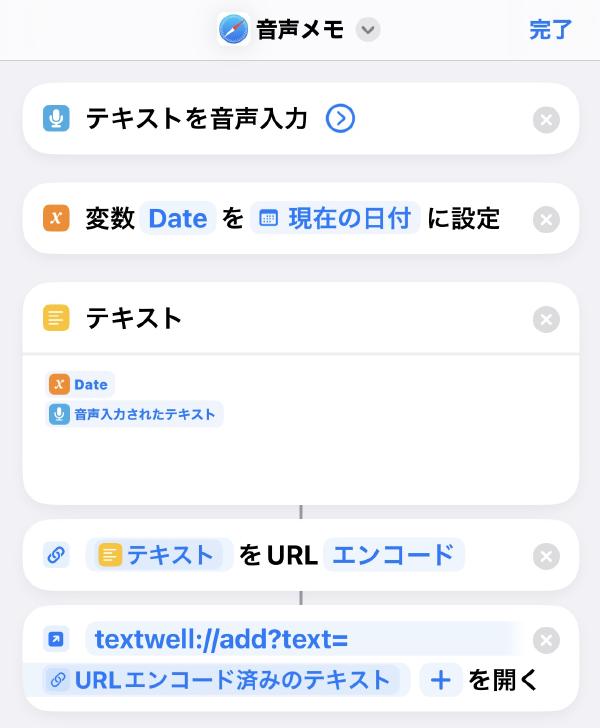
このエントリは生成AIで書いたものです このテキストをClaudeでブログ用にリライトしてくださいと指示しました。
「月に数百件のメモが溜まる」「入力速度はキーボード入力と比較して約3倍に」など書いてないこともシレッと入れてくるので、書き手としても読み手としても注意が必要です😅
これとは別に、音声入力したテキストをClaudeに投げて構造化、Markdown化するショートカットも作っていますが、テキスト化に時間がかかり、気軽にメモをする感じではないので用途によって使い分けしています。
iPhoneの音声入力を劇的に効率化する自作ショートカット # スマートフォンでの文字入力に悩まされていませんか?

ファイルの内容を昇順にソートして重複した行を1行にするTextwellのアクションを書いた。
いわゆる$ sort foobar | uniqするアクションです。
https://gist.github.com/htakeuchi/fd9e36227ad1688b31e9b84eafbf17a9
const { text, range } = T; const selectionStart = range.len > 0 ? range.loc : 0; const selectionEnd = range.len > 0 ? selectionStart + range.len : text.length; const lines = text.split('\n'); let pointerStart = 0; let replacingRangeLoc = 0; const hitLines = []; for (const line of lines) { const pointerEnd = pointerStart + line.length; if (pointerStart > selectionEnd) break; if ( (pointerStart <= selectionStart && selectionStart <= pointerEnd) || (pointerStart <= selectionEnd && selectionEnd <= pointerEnd) || (selectionStart < pointerStart && pointerEnd < selectionEnd) ) { if (hitLines.length === 0) replacingRangeLoc = pointerStart; hitLines.push(line); } pointerStart = pointerEnd + 1; // 1 means a line break. } const blankLines = []; const numLines = []; const strLines = []; hitLines.forEach((content) => { const intContent = parseInt(content); if (!content.match(/\S/)) { blankLines.push(content); // Ignore blank line } else if (isNaN(intContent)) { strLines.push(content); } else { numLines.push({ num: intContent, str: content }); } }); numLines.sort((a, b) => a.num - b.num); const sortedNumLines = numLines.map(({ str }) => str); strLines.sort((a, b) => a.toLowerCase().localeCompare(b.toLowerCase())); const sortedLines = [...blankLines, ...sortedNumLines, ...strLines]; // Remove duplicates const uniqueLines = [...new Set(sortedLines)]; // Join lines into text const replacingText = uniqueLines.join('\n'); T('replaceRange', { text: replacingText, replacingRange: { loc: replacingRangeLoc, len: selectionEnd - replacingRangeLoc }, selectingRange: { loc: replacingRangeLoc + replacingText.length, len: 0 }, });
bibinfo-exporter/script.js at main · goryugocast/bibinfo-exporterを参考にAmazonから書誌情報をへ取り込むブックマークレットを作成した。
直接Obsidianに取り込むのは自分の運用に合わないためTextwellへ追記するように。
こちらは書籍専用で、著者名や出版社、出版日などを取り込む。
Amazonの書誌情報をTextwellの追記するブックマークレット
javascript: (() => { const dest_path = 'notes'; //ファイルを格納するパス const amazon_id = 'namaraiicom-22'; // アフィリエイトID let p = document.getElementById("productTitle"); //書籍のタイトルの処理 p = p ? p : document.getElementById("ebooksProductTitle"); const title = p.innerText.trim(); let asin = document.getElementById('ASIN'); //ASIN番号の処理 const a = asin ? asin.value : document.getElementsByName('ASIN.0')[0].value; const url = `https://www.amazon.co.jp/exec/obidos/ASIN/${a}/${amazon_id}/`; const link = `[${title}](${url})`; let image = document.getElementById("imgTagWrapperId"); //書影の処理 image = image ? image : document.getElementById("ebooksImgBlkFront"); const imageurl = image.querySelector("img").getAttribute("src"); const c = document.getElementsByClassName('author'); const pub = []; const ct_list = []; // ctの各要素を保存する配列を新たに定義 for (let g = 0; g < c.length; g++) { const at = c[g].innerText.replace(/\r?\n/g, '').replace(/,/,''); const pu = at.match(/\(.+\)/); const ct = at.replace(/\(.+\)/,'').replace(/ /g,''); ct_list.push(ct); // ctを配列に追加 pub.push(`${pu} [[${ct}]]`); } const author = pub.join(' '); let h1title = `『${title}』`; h1title = h1title.replace(/[\\/:*?"<>|.]/g, char => ({ ':': ':', '\\': '\', '/': '/', '?': '?', '*': '*', '"': '”', '<': '<', '>': '>', '|': '|', '.': '.' }[char])); const mdimage = `[](${url})`; // 登録情報欄を取得 let detail = document.getElementById('detailBullets_feature_div'); if (!detail) { const subdoc = document.getElementById("product-description-iframe").contentWindow.document; detail = subdoc.getElementById("detailBullets_feature_div"); } const detailtext = detail.innerText; const pubdata = detailtext.split(/\n/); pubdata[2] = pubdata[2]?.slice(10); // 出版社 const date = new Date().toLocaleDateString('sv-SE'); const lines = `---%0D%0Atitle: "${h1title}"%0D%0Adate%3A%20${date}%0D%0Aupdated%3A%20${date}%0D%0Andl%3A%0D%0Atags%3A%20読書メモ%0D%0Adraft%3A%20true%0D%0A---%0D%0A${mdimage}%0D%0A-%20${link}%0D%0A-%20${author}%0d%0A-%20${pubdata[2]}%0D%0A%0D%0A%23%23 関連・思い出した本 %0d%0A%23%23 読書メモ%0d%0A`; const app = `textwell:///add?text=${lines}`; window.open(app); })(); こちらは一般的な商品の画像と商品名を取り込む。
Amazon商品の商品名と画像へのリンクをTextwellに追加するブックマークレット
javascript: (() => { const dest_path = "notes"; //ファイルを格納するパス const amazon_id = "namaraiicom-22"; // アフィリエイトID let p = document.getElementById("productTitle") || document.getElementById("ebooksProductTitle"); //書籍のタイトルの処理 const title = p.innerText.trim(); const asinElement = document.getElementById('ASIN') || document.getElementsByName('ASIN.0')[0]; //ASIN番号の処理 const a = asinElement.value; const url = `https://www.amazon.co.jp/exec/obidos/ASIN/${a}/${amazon_id}/`; const link = `[${title}](${url})`; const image = document.getElementById("landingImage"); const imageurl = image.getAttribute("src"); // 自分が必要なパラメータに変換 let h1title = title.replace(/[\\/:*?"<>|.]/g, char => ({ ':': ':', '\\': '\', '/': '/', '?': '?', '*': '*', '"': '”', '<': '<', '>': '>', '|': '|', '.': '.' }[char])); const mdimage = `[](${url})`; const lines = `${mdimage}%0D%0A%0D%0A${link}%0D%0A`; const app = `textwell:///add?text=${lines}`; window.open(app); })();
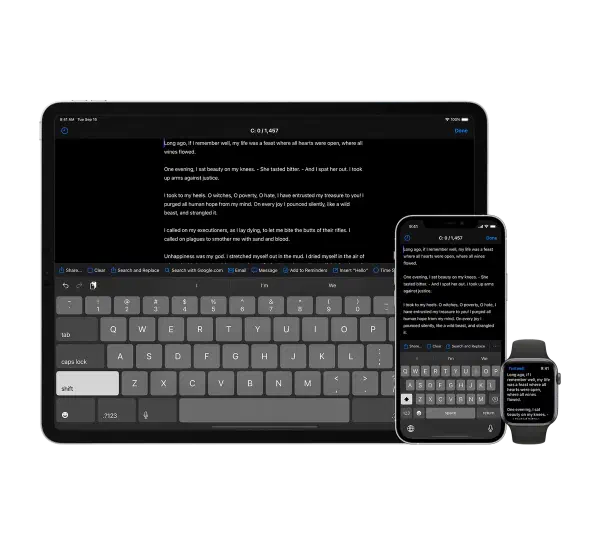
Textwell - The Modeless Textbox for iPhone, iPad, iPod touch, Mac, and Watch.
メモ、メッセージ、ブログ、検索、投稿など、あらゆる文章作成タスクに使用できる多目的テキストエディタ
ファイリングやスタイリングのための機能はないが、JavaScriptベースのカスタマイズ可能なアクション、自動履歴、クラウド同期などをサポートしており、シンプルで拡張性が高い
Mac版、iOS版、AppleWatch版がある
Textwell | URL Schemes
自作のアクションなど # ソートして重複行を削除するTextwellのアクション Obsidianのデイリーノートへ追記するTextwellのアクション Amazonから書誌情報をTextwellへ取り込むブックマークレット
ObsidianのデイリーノートへTextwell から追記するためのアクション。TextwellからObsidianのデイリーノートを書く方法 - Jazzと読書の日々を参考にさせていただき以下の修正を行った。
デイリーノートのディレクトリ構成(YYYY/MM/YYYY-MM-DD.mdとした) 新規作成ではなく追記に変更 1 2 3 4 5 6 7 8 9 10 11 12 13 14 15 16 17 18 19 20 // デイリーノートのルートディレクトリ Root = "journal"; url = "obsidian://"; d = new Date(); y = d.getFullYear(); m = Zero(d.getMonth()+1); // デイリーノートのディレクトリ構成対応(YYYY/MM/YYYY-MM-DD.md) Folder = Root + "/" + y + "/" + m; Title = y + "-" + m + "-" + Zero(d.getDate()); if(Folder) Title = Folder + "/" + Title; if(T.text) url+= "new?content=" + encodeURIComponent("\n") + T.stdin.text + "&file=" + encodeURIComponent(Title) + "&append"; T(url,{option:"cutWhole"}); function Zero(x){ return ("00"+x).slice(-2); }
Using obsidian URI - Obsidian Help
ノートを開く open obsidian://open?vault=my%20vault&file=path%2Fto%2Fmy%20note my vaultのpath/to/my noteを開く ノートを検索する search obsidian://search?vault=my%20vault&query=MOC my vaultでMOCを検索する ノートを作成する new obsidian://new?vault=my%20vault&path=path%2Fto%2Fmy%20note my vaultのpath/to/my note`を新規に作成する オプション vaultボールト名またはボールト ID のいずれか name作成するファイル名。これが指定されている場合、ファイルの場所は「新しいメモのデフォルトの場所」になる file名前を含むボールトの絶対パス。指定した場合はnameは上書きされる path 絶対パス content(オプション) メモの内容 silent(オプション) 新しいメモを開かない場合に指定 append(オプション) ファイルが存在する場合、そのファイルへ追加する overwrite(オプション) 既存のファイルが存在する場合は上書きする x-success(オプション) x-callback-urlを指定する 利用例 # Obsidianのデイリーノートへ追記するTextwellのアクション AlfredからObsidianの保管庫を検索する